

Hemingway Editor
Hemingway Editor makes your writing bold and clear for free online. AI Plus from $8.33/mo. Desktop app $19.99 one-time. See features & review.
Yes, Hemingway Editor is 100% free to use. Evaluated for Writing & Clarity: Hemingway Editor delivers verified capabilities. Best for creators, professionals, and developers looking for reliable workflows without upfront credit card paywalls.
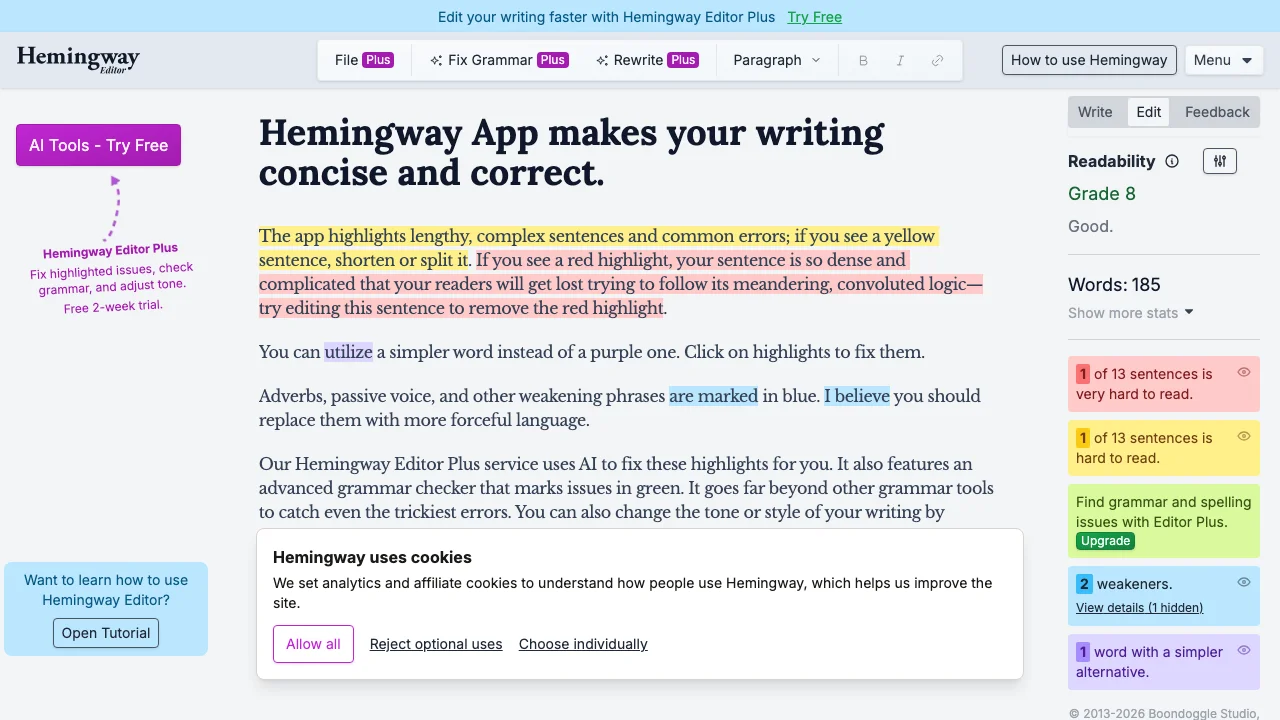
Hemingway Editor is a free online writing tool that improves readability by highlighting complex sentences, passive voice, and adverbs. The free web version requires no signup. Paid options include a $19.99 desktop app and AI Plus subscription from $8.33/month for AI-powered rewrites.
Quick Facts: Architecture, Quotas & Sign-Up
What Is Hemingway Editor?
Hemingway Editor is a celebrated writing and editing platform engineered to make written communications bold, clear, and punchy. Inspired by Ernest Hemingway's minimalist prose, the editor flags wordy sentences, passive voice, unnecessary adverbs, and complex jargon using intuitive color-coded highlights.
Hemingway Editor Pricing (2026)
The core web version of Hemingway Editor is 100% free with zero signup required. For offline writing, a standalone desktop license is available for a one-time fee of $19.99. Creators who want AI assistance can subscribe to Hemingway Editor Plus starting at $8.33/month annually.
Is Hemingway Editor Free?
Yes, anyone can open hemingwayapp.com in their browser and start editing immediately. The free web version provides full access to readability grade level calculations, sentence difficulty warnings, and passive voice tallies without ad clutter or payment paywalls.
Hemingway Editor vs Grammarly
While Grammarly functions as a comprehensive digital proofreader focusing on typos and comma rules, Hemingway is an editorial stylist. Hemingway trains writers to eliminate bloat and write at an accessible Grade 6-9 reading level suitable for mass audiences.
Hemingway Editor Plus AI Features
With Hemingway Editor Plus, writers can highlight any yellow or red sentence and click 'Fix' to let neural models automatically rewrite the clause for conciseness, formal executive tone, or conversational storytelling.
Hands-On Testing: What We Liked & What Annoyed Us
- Free web editor with instant color-coded readability analysis
- Grade-level scoring to eliminate passive voice and bloat
- Zero account creation or sign-in needed for web version
- AI sentence rewrite credits require Hemingway Plus
- Desktop offline app requires a one-time purchase

Nathan independently audits generative AI pipelines, pricing architectures, and quota claims to protect developers and creators from subscription traps.
Frequently Asked Questions: Hemingway Editor
Is Hemingway Editor free?
Yes, the online web editor at hemingwayapp.com is completely free with no account creation or credit card required.
What does Hemingway Editor do?
It color-codes writing to identify sentences that are hard to read (yellow), very hard to read (red), passive voice (green), and excessive adverbs (blue).
Is Hemingway better than Grammarly?
They serve different purposes: Hemingway improves clarity and eliminates wordiness, while Grammarly catches spelling and grammar mistakes. Using both yields the best results.
Does Hemingway Editor have an app?
Yes, a desktop application for Mac and Windows is available for a one-time purchase of $19.99, allowing complete offline editing.